Vision Designer
A 10-week spatial UX project exploring how AR and mixed reality can help people confidently visualise and furnish their spaces in real time.

Overview
Vision Designer enables users to visualize spaces 2× faster through curated selections, personalized assessments, and collaborative AR functionality on Apple Vision Pro.
Recognition
Research
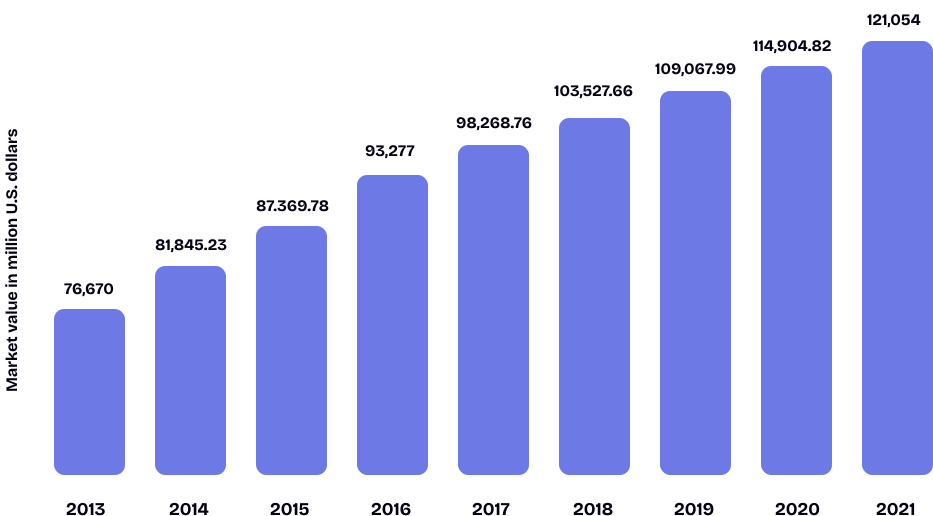
$133B
Global home décor market in 2024
65%
Of homeowners say VR enhances spatial understanding
77%
Of buyers find 3D immersive experiences valuable
3.89%
Projected annual growth through 2029
Key finding: 10 user interviews revealed that people struggle most with spatial visualisation and decision confidence, not product discovery.
Problem
People face a variety of challenges while decorating their homes — from lack of design knowledge to practical spatial limitations — and struggle to evaluate whether spaces suit their personal lifestyles.
Decision Paralysis
Too many options with no clear starting point — people get stuck before they begin.
Spatial Planning
Buying furniture online is a gamble — you never know how it'll fit until it's already in your home.
Style Identification
Most people know what they like when they see it, but can't translate it into their own space.
User Flow
End-to-end flow from onboarding style quiz to AR room placement and checkout.

Sketches
Early ideation sketches exploring spatial layouts and gesture interactions.


Solution
An immersive Apple Vision Pro app with curated style quizzes, AR room placement, and AI-assisted suggestions — designed to make interior design accessible and confident.
To reduce choice paralysis, we introduce users to a small, curated set of styles. This lowers cognitive load and allows recommendations to evolve as users engage with the design process.
Users drag and drop colors, textures, furniture, and decor elements to explore spatial combinations in real time.
Switch between layouts, resize and reposition furniture, and rotate or swap pieces to instantly transform the space.
Explore curated furniture and decor collections, filter by style and budget, and place items directly into your space.
Make aspirational celebrity design achievable. AI compares your favourite celebrity spaces and suggests matching furniture within your budget range.
Check fabrics for longer sustainability with the help of Siri. Get material breakdowns, care info, and eco ratings at a glance.
Get a clear timeline and track the progress of your project. Stay on top of every milestone from concept to completion.
Testing
10
Testers
76.76%
Task Completion Rate
15.6s
Avg. Task Duration
79
SUS Score
Users needed clearer affordance cues for AR gesture interactions — added visual prompts and tooltips.
Marketplace filtering was inconsistent — introduced persistent filters and real-time feedback.
Timeline steps weren't interactive — made each step clickable with expanded views.
Try to find and select an item that you would want to add to your space.
Evaluate marketplace usability, filtering, and item selection flow.
35 seconds
Inconsistent filter and unclear feedback when switching categories.
Persistent filters across categories and introduced real-time visual feedback.
Look at where you can understand the overall project flow and see what's been completed.
Test the project timeline's clarity, interactivity, and information hierarchy.
25 seconds
Users couldn't interact with timeline steps or view details.
Made each step clickable with expanded progress views and tooltips.
Explore visual options to get a sense of style or aesthetics.
Assess how easily users find and interact with the AI-generated moodboard.
30 seconds
Users didn't realise items were draggable or editable in AR.
Moved to main navigation and added call-to-action text for better visibility.
Modify furniture placement or colour using AR.
Assess discoverability and ease of use for interactive object editing in AR.
28 seconds
Users missed affordance cues for spatial editing gestures.
Added visual cues and tap-hold tooltips for editing.
Learnings